Automated Email List Cleaning: How mailfloss Fixes Typos, Blocks Spam Signups & Protects Deliverability
Automated Email List Cleaning: How mailfloss Fixes Typos, Blocks Spam Signups & Protects Deliverability
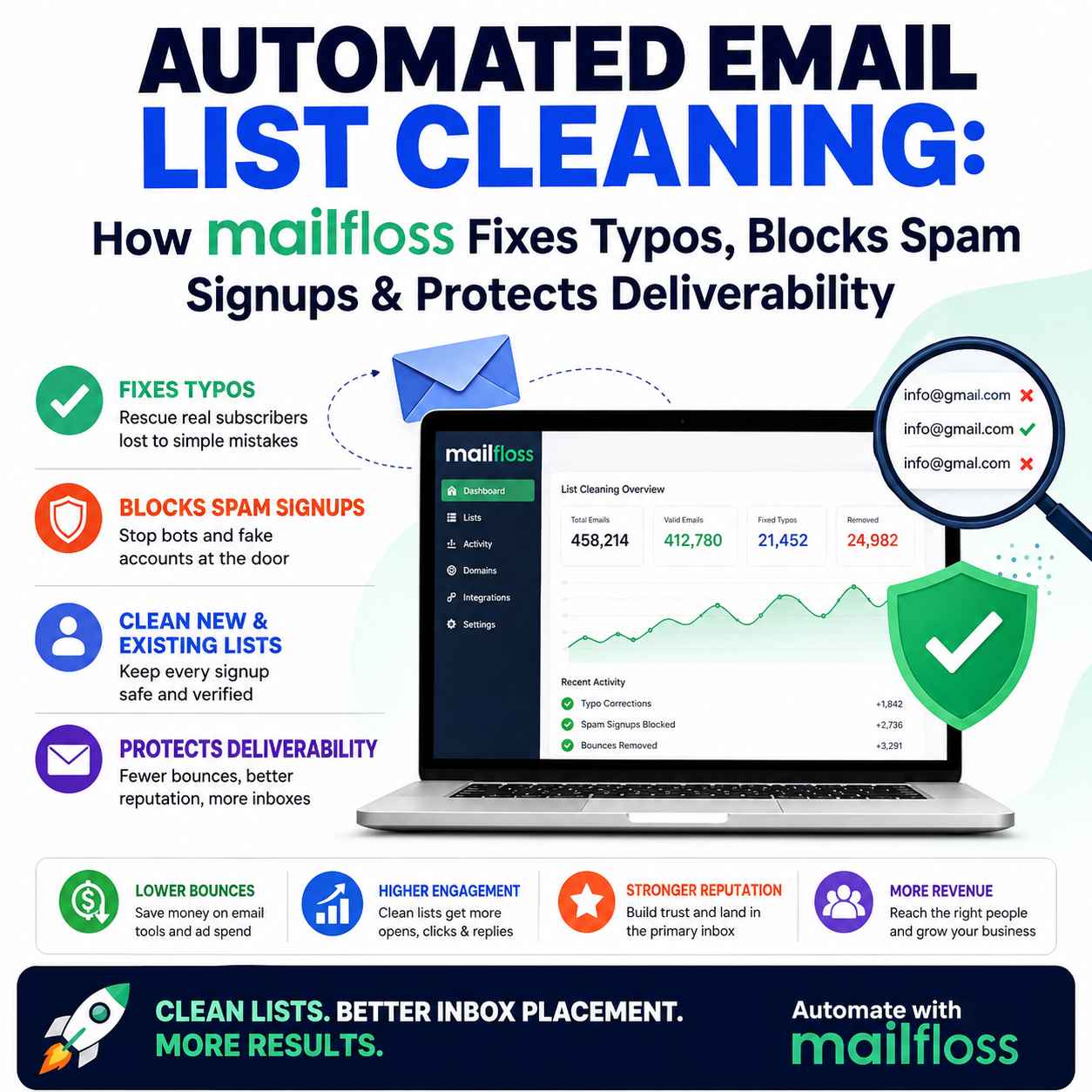
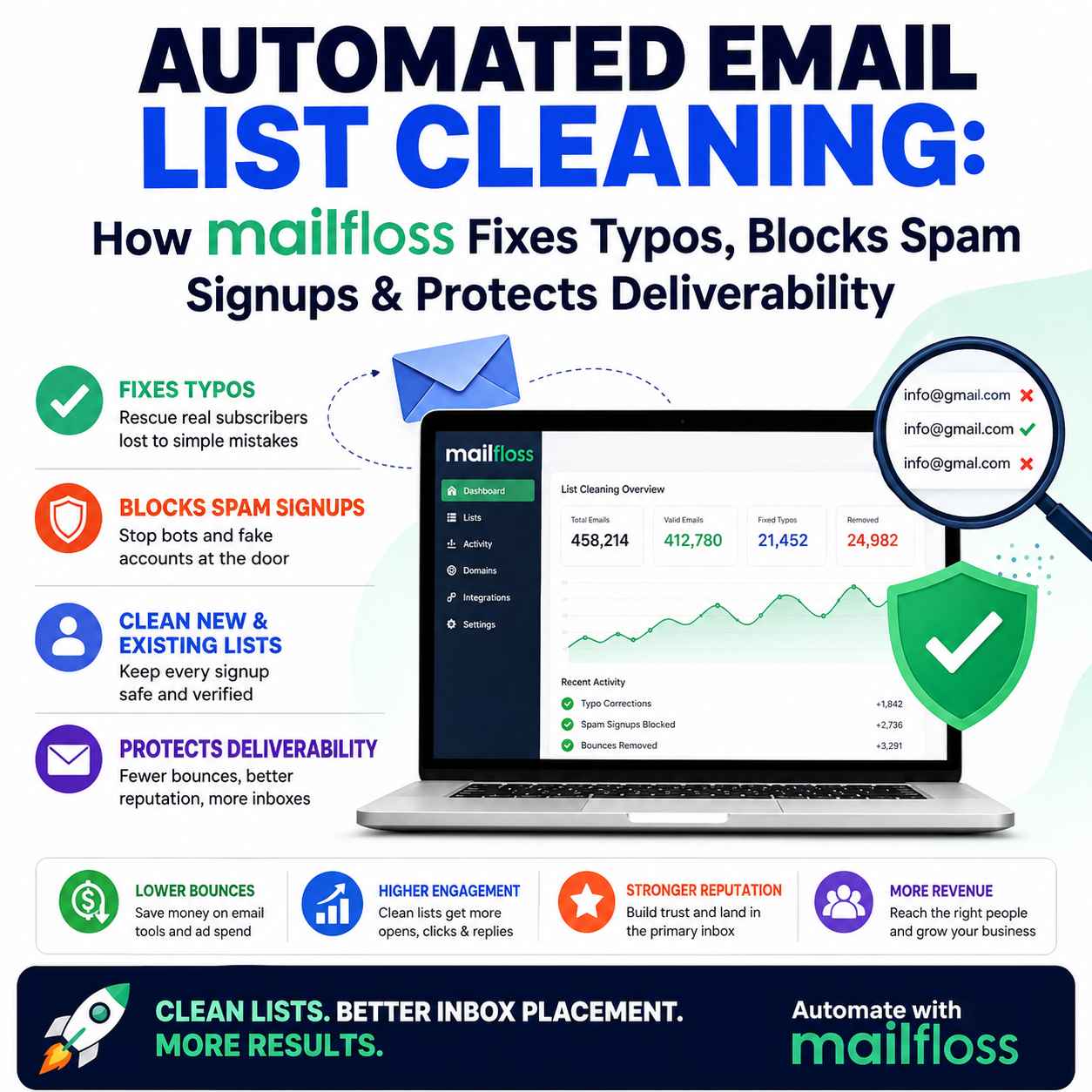
Automated email list cleaning is the process of continuously identifying, fixing, removing, or flagging invalid and risky email addresses without requiring marketers to manually export and re-upload their subscriber lists. A tool such as mailfloss can automate list hygiene by fixing certain common email typos, blocking problematic signups, removing invalid addresses, and periodically checking existing subscribers for list decay. The goal is to reduce unnecessary bounces, control list quality, protect sender reputation, and avoid spending money on contacts that are unlikely to deliver value.
Building an email list takes time and money.
You may spend money on advertising, lead magnets, landing pages, giveaways, content marketing, partnerships, and sales campaigns to acquire every new subscriber.
But there is a problem many marketers discover too late:
Not every new subscriber is a valuable subscriber.
Some people mistype their email address. Bots submit forms. Disposable addresses enter your database. Old subscribers become inactive or their addresses eventually stop working. Hard bounces accumulate.
And if your email platform charges according to contacts or sends, those bad addresses can become a recurring cost.
Worse, poor list quality can contribute to deliverability problems.
This is where automated email list cleaning becomes strategically important.
Instead of waiting until your list becomes a problem and manually exporting a CSV for verification, mailfloss connects with supported email platforms and continuously works in the background to verify and clean contacts. Its current feature set includes typo correction, real-time signup verification, daily cleanup, and protection against address decay.
For marketers who depend on email to generate leads, sales, repeat purchases, or customer engagement, that difference can matter.
Already paying to acquire email subscribers? Don’t let simple typos, fake signups, and bad addresses quietly eat into that investment. See how mailfloss can automatically clean your list while you focus on growing your business.
Why Email List Quality Is a Revenue Problem
It is easy to think of email verification as a technical housekeeping task.
It isn't.
Your email database is a business asset.
If part of that database consists of invalid, fake, disposable, or abandoned addresses, you can end up paying to store and contact people who cannot become customers.
Consider the journey:
Ad spend → visitor → signup → email database → campaign → delivery → engagement → conversion
A bad email address can break that journey before the first campaign is even sent.
There are also several ways an address can become problematic:
- A visitor mistypes the domain.
- A bot submits a fake address.
- A disposable email is used for a temporary signup.
- An address becomes inactive.
- A previously deliverable mailbox stops accepting messages.
- A list accumulates old contacts over time.
- Invalid addresses remain in the database because nobody performs regular cleanup.
That is why effective email list hygiene should be an ongoing process, not a once-a-year cleanup exercise.
What Is Automated Email List Cleaning?
Automated email list cleaning uses software to monitor and validate subscriber data continuously rather than relying entirely on manual list checks.
Traditional workflow:
Export list → upload CSV → verify → download results → remove bad contacts → re-import → repeat
Automated workflow:
Connect platform → configure rules → let the system continuously maintain the list
mailfloss is designed around the second approach. It integrates directly with supported email platforms and can write verification results, removals, tags, and typo corrections back into the platform.
That means marketers do not have to make list cleaning another recurring administrative task.
For businesses sending email every week—or every day—that can be a meaningful operational improvement.
What Makes mailfloss Different?
There are plenty of email verification services.
The interesting question is not:
“Can this tool identify bad email addresses?”
Many tools can.
The better question is:
“What happens when the address is almost correct?”
This is where mailfloss has a distinctive proposition.
Its Typo Fixer is designed to recognize more than 250 common typo patterns and correct certain mistyped domains rather than simply treating those addresses as invalid.
That distinction matters because deleting an invalid address and recovering a genuine subscriber are not the same outcome.
1. Fix Email Typos Instead of Automatically Losing Subscribers
Imagine a customer intends to enter:
but accidentally enters:
A basic verification workflow may simply classify the address as invalid.
mailfloss's Typo Fixer is designed to recognize patterns like this and correct eligible mistakes so the subscriber can remain on the list.
For marketers paying to acquire subscribers, this is more than an email-quality feature.
It is a customer-acquisition protection mechanism.
You already spent money getting the person to your website.
You already convinced them to subscribe.
If the only problem is a simple typing error, deleting that subscriber can mean throwing away part of the acquisition investment.
That is one of the strongest reasons to evaluate automated email list cleaning based on recovered subscribers, not merely deleted addresses.
2. Block Bot and Spam Signups at the Point of Entry
Cleaning a list after it has been polluted is useful.
Preventing bad data from entering in the first place is better.
mailfloss's Instafloss feature is designed to verify new signups in real time and stop problematic addresses such as bots, fake addresses, disposable emails, role accounts, and dead domains before they contaminate the list.
This creates a two-stage approach:
Prevent bad data → clean existing data
That is considerably stronger than relying exclusively on periodic bulk verification.
For businesses collecting leads through:
- Newsletter forms
- Landing pages
- Lead magnets
- Ecommerce popups
- Free trials
- Content downloads
- Giveaways
- Webinar registrations
keeping poor-quality addresses out of the database from the beginning can simplify ongoing list management.
If fake registrations and abusive form submissions are your bigger concern, our guide to real-time email protection for forms looks specifically at how Bouncer Shield tackles those problems before they pollute your database.
3. Clean New Subscribers Automatically
What happens when you cannot modify every signup form?
That is where automated daily cleanup becomes useful.
mailfloss's Autofloss workflow checks new subscribers on a recurring basis, providing a second layer of protection for addresses that may have slipped through initial verification.
The benefit is straightforward:
You do not have to remember to run a manual verification campaign every time new contacts arrive.
The system keeps working.
For a busy marketing team, that removes another recurring task from the operational calendar.
4. Protect Older Lists From Email Address Decay
There is another problem marketers often overlook.
An email address that was valid when somebody subscribed may not remain valid forever.
People change jobs.
Companies close.
Domains disappear.
Mailboxes become inactive.
Email accounts are abandoned.
That means a clean list today is not necessarily a clean list six months from now.
mailfloss's Decay Protection is designed to periodically re-check existing contacts so addresses that become problematic over time can be identified.
This is an important distinction between one-time email verification and continuous email list hygiene.
5. Reduce the Number of Bad Addresses You Send To
Every unnecessary email sent to an invalid address creates wasted activity.
Depending on your email platform and pricing model, large numbers of unwanted contacts can also increase the cost of maintaining your database or sending campaigns.
More importantly, consistently poor list quality can create deliverability concerns.
Removing or managing invalid addresses is therefore not simply about making a spreadsheet look cleaner.
It is about maintaining a healthier sending database.
mailfloss is specifically positioned around automatically removing or managing problematic contacts and protecting sender reputation through continuous list cleaning.
How mailfloss Works
The basic workflow is deliberately simple.
Step 1: Connect Your Email Platform
mailfloss supports a broad range of email marketing and customer platforms, including Mailchimp, Klaviyo, HubSpot, ActiveCampaign, ConvertKit and many others. Its integration directory currently lists more than 40 platforms.
Step 2: Configure Your Rules
You can determine how different verification results should be handled.
Depending on the connection and configuration, addresses can be removed, archived, tagged, or handled through other available workflows.
Step 3: Let Automation Handle the Routine Work
New subscribers can be checked, existing lists can be cleaned, and older contacts can be re-verified according to the relevant workflow.
Step 4: Monitor Your List Instead of Manually Rebuilding It
The objective is simple:
Set it up once and reduce the amount of manual list maintenance required afterward.
That is the real value proposition behind automated email list cleaning.
mailfloss Integrations: Does It Work With Your Email Platform?
Integration is one of the most important considerations before purchasing an email verification tool.
There is little value in choosing a sophisticated verifier if your team must constantly export and re-import subscriber data.
mailfloss currently supports more than 40 email platforms, including:
- Mailchimp
- Klaviyo
- HubSpot
- ActiveCampaign
- ConvertKit
- beehiiv
- GoHighLevel
- Brevo
- Drip
- MailerLite
- Constant Contact
- Campaign Monitor
- Moosend
- Customer.io
- Ghost
- GetResponse
- and many others.
This is particularly relevant for businesses that want email verification without manual CSV exports.
If your platform is supported, the native connection can make ongoing list maintenance considerably easier.
If it is not, mailfloss also provides alternative workflows including CSV uploads, API access, Google Sheets, Airtable, Zapier, webhooks, and a JavaScript form widget.
mailfloss vs Manual Email List Cleaning
Manual cleaning can work.
For a small, rarely changing list, you may not need sophisticated automation.
But as your database grows, the manual process becomes harder to justify.
| Manual List Cleaning | Automated List Cleaning |
|---|---|
| Export subscriber data | Connect your email platform |
| Upload a CSV | Automated verification |
| Wait for results | Continuous monitoring |
| Download cleaned list | Results can flow back into platform |
| Remove or tag contacts | Rules automate handling |
| Re-import data | No recurring CSV round trip |
| Repeat periodically | Ongoing list hygiene |
The biggest advantage is not simply speed.
It is consistency.
A process that depends on someone remembering to clean the database will eventually be skipped.
Automation keeps the process running.
mailfloss vs Traditional Email Verification
This distinction is particularly important for buyers.
Traditional verification is often excellent when you need to check a list before a campaign.
For example:
“I have 100,000 email addresses. Are they safe to send to?”
That is a bulk verification problem.
But mailfloss is aimed more heavily at the ongoing problem:
“How do I stop my email list from becoming dirty again after I clean it?”
That is an automation problem.
The two approaches are not necessarily competitors in every situation.
A business may reasonably use one tool for a large historical database audit and another workflow for continuous subscriber hygiene.
mailfloss and Sender Reputation
Sender reputation is one of the biggest reasons to take list quality seriously.Your subscribers' addresses are not just database records.
They affect what happens when you send campaigns.
Large numbers of invalid addresses and repeated bounces can become warning signs that your list acquisition or hygiene practices need attention.
mailfloss positions continuous verification and cleanup as part of a broader strategy for protecting sender reputation.
However, there is an important reality:
Email verification alone does not guarantee inbox placement.
Good deliverability also depends on factors such as:
- Sender authentication
- Domain reputation
- Engagement
- Complaint rates
- Sending practices
- Content
- List acquisition methods
- Bounce management
- Email service provider policies
So think of automated email list cleaning as one important component of a broader deliverability strategy, not a magic switch.
List hygiene is only one piece of the puzzle, so if you want to strengthen the rest of your inbox-placement strategy, our email deliverability guide covers authentication, sender reputation, bounce management, spam prevention, and other practical deliverability fundamentals.
The Business Case: Don't Pay for Dead Weight
Consider what happens when an email database contains thousands of contacts that no longer have commercial value.
You may be paying for:
- Contact storage
- Campaign sends
- Marketing automation
- CRM records
- Lead nurturing
- Segmentation
- Analytics
And you may also be spending advertising money acquiring some of those contacts in the first place.
This creates a simple business principle:
If you are paying to acquire, store and email a subscriber, you should have a reason to believe that subscriber is still worth having.
Automated list cleaning helps enforce that principle.
And mailfloss adds an interesting twist: instead of automatically deleting every questionable address, its Typo Fixer attempts to rescue eligible genuine subscribers whose addresses contain recognizable mistakes.
That can make the economics more interesting for businesses with significant acquisition costs.
How Much Does mailfloss Cost?
At the time of this article's review, mailfloss offers subscription plans based on verification volume.
The listed monthly plans include:
- Lite — $29/month
- Business — $59/month
- Pro — $209/month
The plans differ in verification volume, connected platforms, support and advanced functionality. mailfloss also offers prepaid credits for one-time verification instead of a recurring subscription.
All subscription plans currently include a 7-day free trial, according to mailfloss's pricing page.
Pricing can change, so prospective buyers should verify the current plan and usage limits before subscribing.
Which mailfloss Plan Makes Sense?
The right plan depends on your list size and workflow.
Small businesses and smaller email lists
The Lite plan may be appropriate when you need automated cleaning for one email platform and your verification volume fits within the plan.
Growing ecommerce and marketing teams
The Business plan is positioned for higher-volume marketing workflows and supports multiple connected email platforms.
Larger or more complex teams
The Pro plan becomes more relevant when you need higher verification capacity, more connected platforms, advanced automation and additional support.
One-time list cleanup
If you only need to clean an existing CSV rather than continuously maintain a connected email platform, prepaid credits may make more sense than starting a subscription.
The smartest approach is not automatically choosing the most expensive plan.
Match the plan to your actual verification volume and workflow.
Who Should Use mailfloss?
mailfloss is particularly interesting for businesses where email is directly connected to revenue.
Ecommerce brands
If you spend heavily on customer acquisition, recovering legitimate subscribers lost to simple email typos can be valuable.
Newsletter publishers
Large subscriber lists can accumulate invalid and decayed addresses over time.
SaaS companies
Free trials, product registrations and lead forms can attract both genuine users and low-quality automated submissions.
Agencies
Agencies managing email marketing for multiple clients can benefit from automated list hygiene rather than repeatedly performing manual cleanup.
B2B marketers
Keeping CRM and marketing databases clean becomes increasingly important as contact volumes increase.
Small businesses
Smaller teams often have the most to gain from automation because they have fewer people available to perform repetitive marketing operations.
Who May Not Need mailfloss?
No tool is necessary for every business.
You may not need continuous automated list cleaning if:
- You have a very small list.
- You rarely send email.
- Your list is manually maintained.
- You do not acquire new subscribers regularly.
- You already have an effective automated verification workflow.
- You only need to validate a single list once.
In those situations, a one-time verification service or prepaid credits could be more economical.
The real question is:
How frequently does your list change, and how expensive is it when bad data gets through?
mailfloss vs Bouncer: Which Approach Is Better?
This is where Kuruntha Smarket readers should pay attention.
I have previously covered Bouncer for businesses looking for secure email verification and list validation. Bouncer's strengths include bulk verification, real-time verification, security and deliverability-focused list hygiene.
I have also covered Bouncer Shield, which focuses specifically on protecting forms from fake, invalid and abusive signups in real time.
mailfloss takes a somewhat different angle.
Choose a traditional verification workflow when:
- You mainly need bulk verification.
- You want to upload a list before a campaign.
- You want a dedicated verification process.
- You prefer manual control over when lists are cleaned.
Consider mailfloss when:
- You want continuous automated email list cleaning.
- You want to connect directly to your existing email platform.
- You want typo correction rather than simply deleting questionable addresses.
- You want new signups checked automatically.
- You want older contacts re-checked as the list ages.
This is why I would not position mailfloss as simply another Bouncer alternative.
They solve overlapping problems, but the workflow and emphasis can be different.
If you want a deeper look at traditional email verification, accuracy, bulk validation, real-time verification, and sender-reputation protection, our Bouncer email verification guide breaks down where that approach fits.
The Best Email List Cleaning Strategy Is Continuous
There is an outdated approach to email hygiene:
Clean the list once → forget about it → clean it again when bounce rates become uncomfortable.
Modern email marketing needs a better system.
Think of list hygiene as a pipeline:
At signup:
Prevent bad data.
Immediately after signup:
Verify anything that needs additional checking.
Daily:
Clean newly added contacts.
Periodically:
Re-check older contacts.
Before major campaigns:
Review overall list health.
This is much closer to how businesses should think about email data quality.
mailfloss's combination of real-time verification, daily cleanup and decay protection is designed around this continuous model.
Is Automated Email List Cleaning Worth It?
For businesses that depend heavily on email marketing, yes—provided the cost of bad data is greater than the cost of maintaining list hygiene.
That calculation is different for every company.
Ask yourself:
- How many new subscribers do I acquire every month?
- How much does each subscriber cost to acquire?
- How often do I send email?
- Does my email provider charge according to contacts or volume?
- What is my current bounce rate?
- How old is my database?
- How frequently do I clean it?
- How many people are responsible for maintaining it?
- How much revenue comes from email?
- What happens financially when a genuine subscriber is lost because of a typo?
If those numbers are meaningful, automated list hygiene deserves serious consideration.
Our Verdict: Is mailfloss Worth Trying?
mailfloss is compelling for marketers who want email list cleaning to become an automated background process rather than another recurring marketing chore.
Its strongest differentiator is not simply email verification.
It is the combination of:
- Automated list cleaning
- Typo correction
- Real-time signup verification
- Spam and bot signup protection
- Daily cleanup
- Address-decay protection
- Direct email-platform integrations
- Alternative CSV, API and automation workflows
The Typo Fixer is particularly interesting because its purpose is to preserve eligible subscribers who may otherwise be discarded because of recognizable typing mistakes.
For a business spending significant money on lead generation, that deserves attention.
If your biggest problem is a one-time bulk list that needs validation, another verification workflow may be perfectly adequate.
But if your question is:
“How can I keep my email list clean automatically after subscribers keep joining?”
that's where mailfloss becomes much more relevant.
Final Takeaway
Your email list should not be treated as a static database.
It is a living business asset.
Subscribers enter.
Some addresses are mistyped.
Some are fake.
Some are disposable.
Some become inactive.
Some simply stop working.
Without ongoing maintenance, the quality of the list gradually deteriorates.
Automated email list cleaning changes that model.
Instead of periodically discovering that your database has become unhealthy, you can build list hygiene into the acquisition and marketing process itself.
mailfloss takes that approach by combining real-time signup verification, typo correction, automated daily cleaning and periodic protection against list decay.
For marketers who care about deliverability, acquisition efficiency and keeping their email database commercially useful, that makes it worth testing.
Don't just build a bigger email list. Build a cleaner one.
If email is an important part of your customer acquisition strategy, this is worth testing rather than putting off another list cleanup. Start with mailfloss and see how much of the routine verification and list hygiene you can take off your plate.
Frequently Asked Questions
What is automated email list cleaning?
Automated email list cleaning is the ongoing process of identifying, correcting, removing or managing invalid and risky email addresses without requiring marketers to manually export and re-import their subscriber lists.
How does mailfloss clean an email list?
mailfloss connects with supported email platforms and automates verification and cleanup. Depending on the workflow, it can fix eligible typos, identify problematic addresses, clean new subscribers, and re-check older contacts for list decay.
Can mailfloss fix email address typos?
Yes. mailfloss's Typo Fixer is designed to identify and correct more than 250 common typo patterns across major email domains.
Does mailfloss block spam signups?
mailfloss's Instafloss feature is designed to verify new signups in real time and block problematic addresses such as bot submissions, fake addresses and disposable emails.
Can mailfloss reduce email bounces?
Cleaning invalid and problematic addresses can reduce the number of undeliverable contacts you send to. mailfloss specifically positions its automated verification and cleanup around reducing bounces and protecting sender reputation.
Does mailfloss work with Mailchimp?
Yes. Mailchimp is among the email platforms currently supported by mailfloss.
Does mailfloss work with HubSpot?
Yes. HubSpot is currently listed among mailfloss's supported integrations.
Does mailfloss work with Klaviyo?
Yes. Klaviyo is currently supported by mailfloss.
Does mailfloss require manual CSV exports?
Not when you use a supported native integration. mailfloss is designed to connect directly to supported email platforms and automate the cleanup process there. CSV upload is also available for one-time list verification.
Can I use mailfloss without a subscription?
Yes. mailfloss offers prepaid verification credits for one-time list cleaning, alongside recurring subscription plans for automated cleanup.
Does mailfloss offer a free trial?
Yes. The current subscription plans include a 7-day free trial.
How much does mailfloss cost?
At the time of this review, listed monthly plans start at $29 for Lite, $59 for Business and $209 for Pro. Pricing and included verification volumes can change, so check the current pricing before purchasing.
Is email verification enough to guarantee good deliverability?
No. Email verification is an important part of list hygiene, but deliverability also depends on sender authentication, reputation, engagement, complaints, sending practices and other factors.
Is mailfloss better than other email verification tools?
That depends on your workflow. mailfloss is particularly attractive when you want continuous automated list cleaning, typo recovery, real-time signup protection and decay monitoring rather than relying primarily on occasional bulk verification.
Is automated email list cleaning worth paying for?
For businesses with growing lists, significant acquisition costs or frequent email campaigns, it can be worthwhile because maintaining list quality can reduce wasted contacts and repetitive manual work. Smaller or infrequent senders may find one-time verification more economical.
Start Cleaning Your Email List Automatically
If your business is already spending money to acquire subscribers, allowing preventable bad addresses to remain in your database is an unnecessary leak.
mailfloss offers a 7-day free trial on its subscription plans, giving marketers an opportunity to test automated list cleaning before committing.
#EmailMarketing #EmailListCleaning #EmailVerification #EmailListHygiene #EmailDeliverability #MarketingAutomation #EmailMarketingTools #DigitalMarketing #LeadGeneration #SenderReputation #MarketingTechnology #EcommerceMarketing #SaaSMarketing #EmailAutomation #BusinessGrowth